Subscribe:
Showing posts with label SSL-security. Show all posts

Sunday, 28 August 2011

Twitter adds SSL security


Summary:- Worried about people grabbing your Twitter password out of the air? You should be. Twitter is finally addressing the problem.


I was sitting in a local coffee shop recently and, since I was bored, I kicked on a Windows instance in VirtualBoxon my Mint Linux-powered laptop so I could runFiresheep. Firesheep was, and is, a hacking program meant to frighten people into being serious about their Wi-Fi security. It didn’t work. Most people, and Web sites, still don’t secure even their logins. So, sure enough, out of twenty-one active Wi-Fi connections, I could look over the shoulder of twenty of them. This is just sad.


Still, some interactive Web sites are finally adding basic security. The Google sites support Transport Layer Security (TLS) and its ancestor Secure Sockets Layer (SSL) for protection,Facebook added encypted security early this year, and now Twitter is joining the list of sites that use SSL to secure its users’ connections.

It’s about time!

Now that I have that out of my system, here’s how it works. Twitter is turning HTTPS, the Web’s fundamental data transfer protocol with SSL enabled on by default with some accounts. To see, if you account is one of the lucky ones, go to your Twitter Accounts Preferences.

Once there, go down the display to the Always use HTTPS box and click it on. If you haven’t logged in, you’ll need to login for this choice to take.

From here on out, whenever you connect with Twitter, your connection will be listed as:


https//twitter.com

instead of


Depending on your browser, you may also see a change in color on part of your address bar. With Chrome 13 and Firefox 6, for example, the first part of the URL will be colored green.

On the “official” Twitter iPhone and iPad applications, your communications are always encrypted via HTTPS, regardless of whether you have checked Always use HTTPS on or off. If you visit mobile.twitter.com from your browser, though your communications will be encrypted only if you specifically log in via https://mobile.twitter.com/.

Yeah, they know that’s kind of dumb too and they’re working on getting it right. Last, but not least, if you’re using a third-party application, like my own favorite Twitterfall, whether your Twitter connection is encrypted depends entirely on the application.

Twitterfall, alas, doesn’t support SSL or TLS. I get around that problem by using my own Virtual Private Network (VPN). For most people, though, what you really want is just a nice, secure SSL or TLS connection, so good job Twitter! Now, how the rest of you Web sites that are all about user interaction stepping up to the place? Come on, don’t be shy, adding SSL/TLS isn’t that hard these days.


Palo Alto PA-5060 is one fast firewall


Palo Alto's new firewall delivered performance 10 times faster than when we tested in 2008, and came close to its rated capacity of 20Gbps in firewall-only mode, according to our exclusive Clear Choice testing.

Palo Alto's new firewall delivered performance 10 times faster than when we tested in 2008, and came close to its rated capacity of 20Gbps in firewall-only mode, according to our exclusive Clear Choice testing.

Of course, there is always a tradeoff between security and performance. In the case of Palo Alto's PA-5060, it all depends on what features you turn on and off.

Palo Alto has shaken up the firewall market with its "application aware" feature, and we found that this next-generation capability carries no performance penalty. The PA-5060 does application-layer inspection by default.

On the other hand - and this is a pretty big caveat - UTMrates were nowhere near the device's stated 20Gbps limit. Performance was far lower with any UTM feature enabled than when the PA-5060 operated in firewall-only mode.

Regardless of which UTM features we enabled - intrusion prevention, antispyware, antivirus, or any combination of these - results were essentially the same as if we'd turned on just one such feature. Simply put, there's no extra performance cost, beyond the initial sharp drop in rates, for layering on multiple types of traffic inspection.

Rates also fell when the device handled SSL traffic. And when decrypting SSL traffic, the system's four 10-gigabit Ethernet interfaces ran at rates that would make Fast Ethernet aficionados smile.

Some of this is to be expected. All security devices slow down when handling SSL traffic, and we've seen far bigger drops, in percentage terms, when enabling UTM features.

Overall, we'd characterize the PA-5060 as a capable performer. While it offers many unique application-inspection capabilities, it doesn't quite do away with the perennial question about security-vs.-performance tradeoffs.

Web Metrics

Forwarding rate was the primary metric in our tests. We used both mixed and static HTTP loads to measure rates under various configurations, along with separate tests to assess performance for SSL traffic. We also verified the PA-5060's TCP connection capacity and connection setup rate.

The forwarding rate tests clearly show that the PA-5060, which can be equipped with up to four 10-Gbit/s interfaces, runs at least 10 times faster than earlier Palo Alto models.

In a test involving heavy Web traffic with a mix of content types and object sizes, the PA-5060 moved data at around 17Gbps when configured as a firewall.

That's a bit under the system's 20Gbps rated capacity, which isn't altogether surprising since such data-sheet numbers often are obtained using best-case conditions such as a single large object requested over and over.

In contrast, the traffic load we used involved a mix of text, images and binary content of various sizes - just the sort of Web traffic often seen on enterprise networks. The 17Gbps rate we saw in testing is probably a more meaningful predictor of performance on production networks.

The mixed traffic load offered here is identical to the one Network World's Joel Snyder used in his 2008 review of Palo Alto's PA-4020 firewall. In that test, the PA-4020 topped out at around 1.6Gbps (vs. of a rated capacity of 2.0 Gbps).

UTM's performance penalty

As with most other security devices, rates fall sharply if various UTM functions - such as antispyware, antivirus, and intrusion prevention capabilities - are enabled. Again using the same mixed Web load, we saw rates drop from 17Gbps to around 5.3G or 5.4Gbps.

The good news is that rates held steady regardless of the number of UTM functions in use. So, it doesn't matter whether the PA-5060 does antispyware, antivirus, intrusion prevention, or any combination of these.

One way of boosting forwarding rates is to disable server response inspection, which checks traffic flowing from servers to clients. Disabling this feature caused rates to nearly triple, to 13.7Gbps. This setting is mainly useful when the firewall sits in front of data centers or other server farms. Enterprise network managers deploying firewalls to protect clients will want to keep server inspection enabled (which is the default setting).

Speed Bump: SSL Handling

SSL encryption is compute-intensive. Even with dedicated silicon for the task, the PA-5060, like virtually all other high-end firewalls, is a far slower performer when handling SSL traffic.

The PA-5060 generally moved traffic at around 7.5G to 7.6Gbps in every test case. We initially suspected that the nearly identical rates were caused by some limit in our test gear. But back-to-back tests of the Spirent Avalanche equipment without the PA-5060 in line moved traffic at around 8.6Gbps, faster than the firewall. So the test gear wasn't the bottleneck. (See our test methodology.)

Rates for SSL traffic are higher than those for cleartext traffic, except in the firewall-only test case. This suggests the PA-5060 does less inspection of SSL traffic by default. Palo Alto's engineers confirmed this, but only for the particular traffic generated by Spirent Avalanche; in this case, the PA-5060 simply classified the traffic as type "SSL" and did no further inspection. Palo Alto says there are cases where the PA-5060 can detect certain attacks hidden in SSL traffic, but we did not attempt to verify that claim.

The PA-5060 does support decryption of SSL traffic for deeper inspection, but that feature comes with a heavy performance cost. When doing SSL decryption, rates fell to 986Mbps when the PA-5060 acted as a firewall, and just 108Mbps with all UTM features enabled.

Both numbers are a long way off from the 17-Gbps rates we saw in the cleartext tests, or even the 7.5-Gbps rates in the SSL tests without decryption. If higher-speed decryption of SSL is required, network managers might consider a purpose-built appliance such as those from Netronome and other vendors.

Static Object Handling

A traffic load that mixes object sizes offers one approximation of what enterprise Web traffic might look like, but it's certainly not applicable in all situations. We also ran separate tests with fixed object sizes: One with 10-kbyte objects, since this is close to the average object size as observed in many studies of Web logs, and another with 512-kbyte objects, since this large size would better describe maximum firewall rates.

Of course, no production network carries Web traffic where every request is for 10- or 512-kbyte objects, but modeling some allegedly "real world" condition wasn't the goal here. The tests with static object sizes had a simpler goal: To describe the limits of firewall performance when handling average and large Web objects.

Not surprisingly, the PA-5060 turned in its single fastest result, nearly 18.7Gbps, in tests when configured as a firewall and presented with 512-kbyte objects. With average 10-kbyte objects, rates were a bit slower, around 16.3Gbps.

Enabling UTM features produced a similar result as with the mixed-object loads: Rates were substantially lower than in the firewall-only tests, but very consistent regardless of which combination of antispyware, antivirus and intrusion prevention we used. Here again, the PA-5060 moved large objects faster than average-sized objects after we'd enabled UTM features, though by a smaller margin than in the firewall-only tests. With UTM features turned on, the PA-5060 moved large objects only about 1Gbps faster (around 6.2G to 6.3Gbps) than average-size objects (around 5.2Gbps).

The PA-5060 also moved SSL traffic at lower rates when static objects were involved, especially in tests with large objects. This is an expected result, since more bytes means more work for the device's encryption engine. In most SSL test cases, rates were around 10.5G to 11Gbps with average-size objects and around 8.8Gbps with large objects.

Also, traffic rates for SSL were around the same regardless of which features we enabled or disabled on the firewall. As in the mixed-object tests, the PA-5060 didn't try any further inspection after classifying the Spirent traffic as SSL.

Decrypting SSL traffic carried a heavy performance cost, even higher than in the mixed-object tests. With SSL decryption enabled, rates fell as low as 100Mbps when we offered large objects to the PA-5060. And, we used the weaker RC4-MD5 cipher; if anything, rates would likely be lower still with a stronger cipher such as AES256-SHA1.

TCP Connection Testing

While traffic rates are undoubtedly useful in characterizing firewall performance, they're not the only metrics that matter. We also conducted separate tests to determine how many concurrent connections the PA-5060 could handle, and how quickly it could set up and tear down those connections.
In the TCP connection capacity tests, we configured Spirent Avalanche to build up successively larger connection counts by having each existing connection make one new HTTP request every 60 seconds. The largest number of concurrent connections the PA-5060 handled without errors was 3,620,979. While 3.6 million is a huge number, it's also less than the device's rated capacity of 4 million. After testing concluded, Palo Alto said it had identified a bug in the software version we tested, and that a release scheduled for release by press time would allow the firewall to handle 4 million concurrent connections. We did not test the new software.

In a related test, we also examined the maximum rate at which the firewall would set up and tear down new connections. Here, we configured Spirent Avalanche to use HTTP version 1.0, forcing each HTTP request to set up a new TCP connection. When handling this load, the PA-5060 handled 44,120 connections per second error-free when using all four of the device's 10-gigabit Ethernet interfaces. In tests involving two interfaces and an earlier version of the Palo Alto software, we observed error-free rates of nearly 47,000 connections per second. Either rate is very high and will probably be more than sufficient for the majority of enterprise users.

While there's room for improvement in the PA-5060's performance, especially when it comes to UTM performance and SSL decryption, we're encouraged by these results. The PA-5060 is already far faster than the PA-4020 tested earlier, and it's still one of the few firewalls with true application-layer inspection capabilities. With some optimizations to UTM and SSL performance, it may do away with security/performance tradeoffs once and for all.

Thanks Network World gratefully acknowledges the assistance of Spirent Communications, which supplied its Spirent Avalanche 3100 GT traffic appliances for this project. Spirent's Michelle Rhines, Jeff Brown, Glen Cory Jr., and Chris Chapman also provided engineering support.

Newman is a member of the Network World Lab Alliance and president of Network Test, an independent test lab and engineering services consultancy. He can be reached at dnewman@networktest.com.

Read more about wide area network in Network World's Wide Area Network section.

Source URL:-news.idg.no

Tuesday, 23 August 2011

Increase your Website Sales & Security by using GeoTrust QuickSSL Premium Certificate

In today's world of rapidly expanding technology all people are using e-media for buying or selling products and services. Thus, e-commerce is proved to be an important component of business strategy any form of business transaction in which the parties interact electronically rather than by physical exchanges or direct physical contact is known as e-commerce. In simple words, it is an act of buying or selling on internet or other communication networks. The development and acceptance of online shopping, telephone banking, credit cards, data mining, data warehousing, enterprise resource planning (ERP) systems and World Wide Web (Internet) are the revolutionary components of electronic commerce.

But still millions of people are facing security problem for sharing them confidential data on I-world and that’s why they will think twice or leave the websites which does not carries security protocols. That’s why If your site is selling products to the public, it is crucial to develop trust with your users by securing your website with SSL Certificate. GeoTrust QuickSSL Premium certificate is the least pricey option for a valid and relevant SSL certificate. When you display GeoTrust SSL certificate, you inform your users that you value their information and it’s secure. GeoTrust SSL Premium certificate also build the trust to end users that his or her data will not disclose to anyone and this faith creating valuable relation & trust. By this way your online sale will increase exponentially.

GeoTrust QuickSSL Premium certificates are one of the quickest ways for you to start protecting your website online transactions and applications.

Thesslstore.com is one of the largest resellers SSL store in world which offerSSL Certificate for Websites in worldwide including Money Back Guarantee, Price Match Guarantee, Customer Royalty Program, and 24 X 7 hrs Platinum Support System via various communications such as email, live chat, and telephone. So secure your fully qualified domain name, including both the NON-WWW and WWW details, with the GeoTrust QuickSSL Premium now at very affordable cost.

Monday, 22 August 2011

Why isn’t SSL turned on by default for all websites?


Article by Vito Botta, first published on his Blog

There has been a lot of talking, over the past few months, about a Firefox extension called Firesheep which, in the words of author Eric Butler,

“demonstrates  HTTP session hijacking attacks“.

Discussions around the Internet on the matter have been quite heated, with lots of people thanking him for his efforts in raising awareness on the security issues of modern Internet applications, and many others blaming him for making it way too easy for anyone -even people who know close to nothing regarding security- to hack into other people’s accounts on social networks, webmails and other web applications, provided some conditions are met. In reality, all these issues have been well known for years, so there is very little to blame Butler for, in my opinion, while we should pay more attention to the fact that most websites are vulnerable to these issues, still today.  So, if the issues highlighted by Firesheep hardly are news, why has it caught so much attention over the past few months?

Some context

Whenever you login on any website that requires authentication, two things typically happen:

1- first, you are usually shown a page asking you to enter your credentials (typically a username and a password -unless the service uses  OpenID or any other  single sign on solution, which is a quite different story), and upon the submission of a form, if your credentials match those of a valid account in the system, you are authenticated and thus redirected to a page or area of the site whose access would otherwise be forbidden.

2- for improved usability, the website may use  cookies to make logins persistent for a certain amount of time across sessions, so you won’t have to login again each time you open your browser and visit the restricted pages -unless you have previously logged out or these cookies have expired.

During the first step, the authentication requires your credentials to travel over the Internet to reach their destination, and  -because of the way the Internet works- this data is likely to travel across a number of different networks between your client and the destination servers; if this data is transferred in clear on an unencrypted connection, then there is the potential risk that somebody may be able to intercept this traffic, and therefore they could get hold of your credentials and be able to login on the target website by impersonating you. Over the years, many techniques have been attempted and used with different degrees of success to protect login data, but to date the only one which has proven to be effective -for the most part- is the full encryption of the data.

In most cases, the encryption of data transferred back and forth between the servers hosting web applications and the clients, is done by using HTTPS. That is, the standard HTTP protocol, but with the communication encrypted with SSL. SSL works pretty well for the most part: nowadays it is economically and computationally cheap, and it is supported by many types of clients. SSL encryption isn’t perfect though; it has some technical downsides more or less important and, besides these, it often gives the user a false sense of security if we also take into consideration other security treats concerning today’s web applications such as -for example-  Cross-Site Scripting: many people think that a website is “secure” as long as it uses SSL (and some websites even display a banner that says “this site is secure” and links to their provider of SSL certificates… -good cheap advertising for them), while in reality most websites may be affected by other security issues regardless of whether they use SSL encryption or not. However, if we forget for a moment other security issues, the main problem with SSL encryption is, ironically, in the way it is used by most web applications, rather than in the SSL encryption itself.

As mentioned above, web applications usually make use of cookies to make logins persistent across sessions; this is because the web is stateless. For this to work, these cookies must travel between client and server with each request that is for each web page you visit during a session within the same web application. This way the application on the other side can recognize each request made by your client and keep you logged in for as long as the authentication cookies are available and still valid.

The biggest problem highlighted by Fire sheep is that most websites only enable or enforce SSL encryption during the authentication phase, so to protect your credentials while you log in, but then revert to standard, unencrypted HTTP transfers from that point on. This means that if the website makes logins persistent by using cookies, since these cookies -as said- must travel with each request, unless the authentication tokens stored in these cookies are themselves encrypted and thus protected in a way or another (on the subject, I suggest you read  this), as soon as the user has been authenticated these cookies will travel with subsequent HTTP requests in clear (unencrypted) form, so the original risk of somebody being able to intercept and use this information still exists; the only difference is that in this case an attacker would more likely have to hijack your session by replaying the stolen cookies in their browser, rather than trying to login themselves by entering your credentials directly in the authentication form (this is because these cookies, usually, store  authentication tokens rather than credentials). The end result, however, is pretty much the same, in that the attacker can impersonate you in the context of the application.

So, why don’t websites just use SSL all the time?

CPU usage, latency, memory requirements

At this point, if you wonder why all companies don’t just switch SSL on by default for all their services all the time, perhaps the most common reason is that, traditionally, SSL-encrypted HTTP traffic has been known to require more resources (mainly CPU and memory) on servers, than unencrypted HTTP. While this is true, with the hardware available today this really is no longer too big of an issue, as also demonstrated by Google when they decided to allow SSL encryption for all requests to their services, even for their popular search engine. Here’s is what Google engineer Adam Langley said on this a few months ago:

” all of our users use HTTPS to secure their email between their browsers and Google, all the time. In order to do this we had to deploy no additional machines and no special hardware. On our production frontend machines, SSL/TLS accounts for less than 1% of the CPU load, less than 10KB of memory per connection and less than 2% of network overhead. Many people believe that SSL takes a lot of CPU time and we hope the above numbers (public for the first time) will help to dispel that. “

So, if SSL/HTTPS does not require a significantly higher amount of resources on servers, is it just as fine as unencrypted HTTP, only more secure? Well, more or less. In reality, SSL still introduces some latency especially during the handshake phase (up to 3 or 4 times higher than without SSL), and still requires some more memory; however, once the handshake is done, the latency is slightly reduced, plus Google are working on ways to improve latency. So connections are a bit slower, true, but Google -see Langley’s blog post- have partially solved this issues by caching a lot also HTTPS requests. Google have also solved the issue with higher memory usage by patching  OpenSSL to reduce up to 90% the memory allocated for each connection.

Static content and CDNs

Besides CPU/memory requirements and increased latency, there are other issues to take into account when switching SSL on all the time for a website. For example, many websites (especially large and popular ones like Facebook and others that are also targeted by Fire sheep) use a CDN distribution to reduce load on their servers, as well as to improve performance for their users depending on their geographical location; CDNs are great for this since they are highly optimized to serve static content from locations that are closer to users. This often reduces latency and so helps improve the overall performance of the site for those users. In most cases, using a CDN is as easy as serving the static content from canonical hostnames that point to the CDN’s servers directly.

But what happens if a website using a CDN is adapted to use SSL all the time? First, a few general considerations on the usage of SSL encryption with static content.

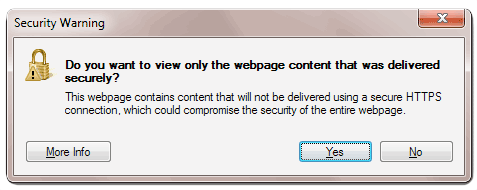
By “static content”, we usually mean images, style sheets, JavaScript, files available for download and anything else that does not require server side processing. This kind of content is not supposed to contain any sensitive information; therefore, at least in theory, we could mix SSL-encrypted, sensitive information served via HTTPS, with unencrypted static content served via HTTP, for the same website, at the same time. In reality, because of the way SSL support is implemented in the browsers, if a page that uses SSL also includes images and other content that is downloaded with normal HTTP transfers, the browser will show warnings that may look “scary” to users who do not know what SSL/HTTPS is. Here’s an example with Internet Explorer:


Because of this, it is clear that for a page using SSL to work correctly in browsers, all the static resources included in the page must also be served with SSL encryption. But this sounds like a waste of processing power... Doesn’t it? Do we really need to encrypt images, for example? So you may wonder why browsers behave that way by displaying those warnings. Actually, there is a very good reason for this: remember cookies? If a web page is encrypted with SSL but it also includes resources that are downloaded with standard, unencrypted HTTP transfers, as long as these resources are served from hostnames that can access the same cookies as the encrypted page those cookies will also travel in clear over HTTP together with those resources (for reasons I’ve already mentioned), making the SSL encryption of the page useless in first place. If browsers didn’t display those warnings, it would be possible to avoid this issue by serving the static resources from hostnames that cannot access the same cookies as the encrypted page (for example, with the page served from mydomain.com and static content served from anotherdomain.com), but it’s just easier and safer to enforce full SSL encryption for everything…

Sounds dirty and patchy, yeah? That’s the web today… a collection of technologies developed for the most part ages ago, when people just couldn’t foresee all the potential issues that have been discovered over the years. And it is funny, to me, that over the past few years we have been using buzzwords like “web 2.0″ not to refer to a set of new technologies that address all those issues but, instead… to refer to new ways of using the same old stuff (and perhaps not even “new”... think of  AJAX)  that have either introduced or highlighted more security issues than ever before.

Back to the CDNs

SSL requires a certificate for each of the hostnames used to serve static content, or a “wildcard” certificate provided that all the hostnames involved are just sub domains of the same domain name (for example, static.domain.com, images.domain.com and www.domain.com would all be sub domains for domain.com); if hostnames for the static content to be served by a CDN are configured as CNAME records that point directly to the CDN’s server, requests for that static content will obviously go straight to the CDN servers rather than to the website’s servers. Therefore, although the required SSL Certificates would already be available on the website’s servers, those certificates must also be installed on the CDN servers for the CDN to serve the static content under those hostnames and with SSL encryption; so in theory it is necessary for the website’s owner to simply provide the CDN company with the required certificates; the CDN provider then has to install those certificates on their servers. In reality, the SSL support provided by some CDN providers can be seriously expensive since it requires additional setup and larger infrastructure because of the aforementioned overhead; plus, most CDN providers do not even offer this possibility since traditionally they have been optimised for unencrypted HTTP traffic, at least so far.

As you can easily guess, the static content/CDN issues alone are already something that could make switching a site like Facebook to using SSL all the time, more challenging than expected.

“Secure-only” cookies

After all I’ve already said about cookies, you may think that as long as the website uses SSL by default, all should be fine. Well... Not exactly. If the website uses by default SSL but still allows requests to a page with unencrypted HTTP, it would still be possible to steal cookies containing authentication tokens / session ids by issuing an unencrypted request (http:// without the s) towards the target website.

This will allow once again the cookies to travel unencrypted, and therefore they could still be used by an attacked to replay a victim user’s session and impersonate them in the context of the web application.

There are two ways to avoid this. The first is to flag the cookies as secure, which means the cookies can only be downloaded with https://, therefore they will be encrypted and the problem disappears. The second is to make sure the web server hosting the web application enforces SSL by rewriting http:// requests to https://. Both methods have basically the same effect with regards to the cookies, however I prefer the second one since it also helps prevent the mixed encrypted/unencrypted content issues we’ve seen above and the related browser warnings.

Websites that use SSL but only for the “submit” action of an authentication form

I have seen SSL used in various wrong ways, but this is my favorite one. I’ve mentioned how Fire sheep has highlighted that most websites only use SSL for the login page, and why this is a weak way to protect the user’s credentials. Unfortunately, there are also websites that only use SSL not for the login page itself, which simply contains the authentication form, but for the page that form will submit the user’s credentials to.

I’ve found an example earlier of a website that once clicked on the “Login” link, redirected me to the page at http://domain.com/login.php – so without SSL. But in the source code I could see that the form’s action was instead set to the page https://domain.com/authenticate.php which was using SSL. This may sound kind of right, in that the user’s credentials would be submitted to the server as encrypted with SSL. But there’s a problem: since the login page itself is not encrypted, who can guarantee that this page will not be tampered with and perhaps submit the user’s credentials to another page (a page the attacker has control over) rather than the authenticate.php page the website’s owner meant?

See now why this is not a good idea?

Content hosted by third parties

CDN is only part of the story when it comes to static content. The other part of the story concerns content that may be included on a page but is served by third parties and you have no control on the content itself nor the way it is served. This has become an increasingly bigger problem nowadays with the rise of social networks, content aggregators, and services that add new functionalities to a website, very easily. Think of all the social sharing buttons that these days we see on almost every website; it’s extremely easy for a website’s owner to integrate these buttons in order to help increase traffic to the site: in most cases, all you have to do is add some JavaScript code to your pages and you’re done.

But what happens if you turn SSL on for your page, which then includes this kind of external content? Many of these services already support the HTTPS protocol, but not all of them, for the reasons we’ve already seen regarding overhead and generally higher demands in terms of resources. Plus, for the ones that do support SSL/HTTPS, you as website owner would need to make sure you’re using the right code snippet that automatically takes care of switching to either HTTP or HTTPS for the external content, depending on the protocol used by your own page. Otherwise, you may have to adapt your own pages so that this switching is done by your code, provided the external service supports SSL, at least.

As for those services that make it easy to add functionality to your website, I’ve already mentioned Discuss, for example, as my favorite service to “outsource” comments. There are other services that do the same (Intense Debate being one of them), and there are a lot of other services that add other kinds of functionality such as content rating or even the possibility for the users of your website to login on that website with their Facebook, Google, etc. credentials.

All these possibilities make it easy nowadays to develop feature-rich websites in a much shorter time, and make it pretty easy to let applications interact with each other and exchange data. However, if you own a website and plan to switch SSL always on for your site, you need to make sure all of the external services the site uses already support SSL. Otherwise, those browser warnings we’ve seen will be back, together with some security concerns.

Issues with SSL certificates

There’s a couple of other issues, perhaps less important, but still worth mentioning, concerning domain names and SSL certificates, regardless of whether a CDN is used or not. The first one is that, normally, it is possible to reach a website both with and without www. So for example both vitobotta.com and www.vitobotta.com lead to this site. At the moment, since readers do not need to login on this site (comments are outsourced to Discuss) there is no reason why I would want to switch this site to always use SSL, at this stage. But if I wanted to do so, I would have to take into account that both vitobotta.com and www.vitobotta.com lead to my homepage, when purchasing an SSL certificate. The reason is that not all SSL certificates secure both www and non-www domains; even wildcard certificates often secure all sub domains (including www) but not the non-www domain; this means that if you buy the wrong certificate for a site you want to use with always-on SSL encryption, you may actually need to buy a separate certificate for the non-www domain. I was looking for an example earlier and I found one very quickly in the website of my favorite  VPS provider Libode. The website uses a wildcard certificate that secures all the *.linode.com subdomains, but not linode.com, so if you try to open https://linode.com in your browser you’ll see a warning similar to this (in Firefox in the example):


Generally speaking, it is better to purchase a certificate that secures both www and non-www domains (and perhaps other subdomains depending on the case). In case you are interested, an example of cheap wildcard certificate that does this is the RapidSSL Wildcard certificate. An alternative could be a certificate with the subjectAltName field, which allows you to specify all the hostnames you want to secure with a single certificate (provided you know all of them in advance).

The other issue with certificates is that companies often reserve several versions of the same domain name differing just by extension, with the purpose of protecting the branding of a website. So, for example, a company may want to purchase the domains company.com, company.info, company.net, company.org, company.mobi and so on; otherwise, if they only purchased for example company.com, others would be able to purchase the other domains and use them to their own benefit, black hat  SEO techniques and more. Good SEO demands that a websites only uses a single, canonical domain, so it’s best practice to redirect all requests to the alternate domain names to the “most important” one the company wants to use as the default one (for example company.com). But as for the SSL certificates, it just means that the company must spend more money when purchasing SSL certificates.

Caching

Caching is one of the techniques most commonly used by websites to reduce load on servers and improve the performance both on the server and on the client. The problem with caching, in the context of SSL encryption, is that browsers differ in the way they handle caching of SSL-encrypted content on the client. Some allow caching of this content, others do not or will only cache it temporarily in memory but not on disk, meaning that next time the user visits the same content, all of it must be downloaded (and decrypted) again even though it has not changed since last time, thus affecting the performance of the website.

And it’s not just about the browsers: ISPs and companies often use  proxies to cache content with the purpose of making web surfing faster. The funny thing is that many caching proxies, by default, do not cache SSL-encrypted content…

So… is an SSL-only web possible or not?

It’s nice to see that Facebook now gives the options to turn SSL on. However, it is a) disappointing, because it’s just an option, not the default, and most people do not even know what SSL is; b) surprising, that this change came not following the hype for Firesheep months ago, despite Facebook being one of the higher profile websites Firesheep had targeted; the change, instead, came after somebody hacked into Mark Zuckemberg’s own Facebook profile…. Perhaps the privacy of Facebook’s CEO is more important than that of the other users?

As for the other several sites targeted by Firesheep, I haven’t yet read of others that have already switched to using SSL all the time by default.

So it’s a slow process…. but I definitely think it is possible to think of an SSL-only web in the near future. Despite switching a website to using SSL all the time can be technically more challenging than one would otherwise expect, the truth is that all the technical issues listed above can be overcome in a way or another. I’ve mentioned how Google has pretty easily adapted some of their services to use SSL by default already, thanks to research and the optimisation of the technologies they were using for those services.  So what Google shows us is that other companies really have no excuses not to use SSL for all their services, all the time, since by doing so they could dramatically improve the security of their services (and, most importantly, their users’ privacy), if only they cared a bit more about the aforementioned issues.

The only problem that may be a little more difficult to overcome depending on the web application and on the available budget, is of economical nature rather than technical. It is true that SSL encrypted traffic still costs more money than unencrypted traffic, but that’s it. In particular, I mean the cost of the required changes to a site’s infrastructure and the overhead in management, rather than the cost of the SSL Certificates, which may not be a problem even for smaller companies, these days.

It is unlikely that we’ll see completely new and more secure technologies replacing the web as we know it today, any time soon; but it is likely that with hardware and network connections becoming faster all the time, the prices of SSL certificates also going down, and further improvements to the current technologies, HTTPS will replace the standard HTTP as the default protocol for the Internet – sooner or later.

In the meantime, as users, we can either wait for this to happen, thus exposing ourselves to the potential risks, or we can instead solve at least partially the problem on our end; in the next few posts we’ll see the easiest and most effective ways of securing our Internet browsing on the most common operating systems, and also why I used the word “partially”.

Tuesday, 9 August 2011

Cisco CCNA Certification: The Worth Of The CCNA And CCNP


One query I see typically on the ‘Net is “Is it price my time to earn a CCNA / CCNP / CCIE certification?” My personal answer to that could be a resounding yes. The facility of Cisco certifications has allowed me to create an amazing career, they usually can do the identical for you.

There has by no means been a greater time to speed up your IT profession, and incomes a technical certification is a great way to just do that. I don’t care when you’re looking at earning an MCSE, a Cisco certification, Pink Hat, or every other vendor – you are always better off having a technical certification than not having one. Technical certifications are a superb solution to market yourself and stand out from the crowd. Earning certifications reveals a potential employer (and your present one) that you are willing to go the additional mile.

Sadly, while you ask this query on most Web message boards, you’re going to get some very unfavourable individuals providing you with their “unbiased” opinion. Ask yourself this query: Do you need to entrust the route of your profession to someone you do not know, has no accountability for what they say, and has some sort of ax to grind? Would you like someone like that to resolve whether or not you must earn a CCNA or CCNP?

I can communicate from expertise on this point. When I informed just a few people that I used to be going to earn my CCIE, virtually 100% of the responses I obtained have been negative. “It’s too arduous”, “nobody can cross that”, “the CCIE is not worth the work”, etc. Each single one of these statements is fake, and again I speak from firsthand experience. The identical is true for the CCNA, CCNP, and MCSE. All of these certifications can add worth to your career and put more money in your pocket. However it’s important to make the decision to earn them and to “hold your goals away from the trolls”.

Don’t ask nameless strangers whether or not it’s “well worth the time” to get a CCNA, MCSE, or other pc certification. The one particular person you need to ask that question of is yourself. Whether you want to start an IT career or jumpstart your present one, make the choice to move ahead in your profession – after which follow via on that decision.

Whenever you’re studying in your CCNA examination on the way in which to incomes this coveted Cisco certification, the details can seem overwhelming! On this article, I’ll point out 5 Frame Relay details that you should be mindful while you’re on your solution to the CCNA examination!

Inverse ARP starts working as quickly as you open the serial interface. This protocol performs dynamic Frame Relay mapping, however you don’t have to allow it – it’s already enabled as soon as you enter the command “encapsulation frame-relay”.

If you’re configuring Frame Relay map statements manually, do not forget that you’re mapping the native DLCI to the distant IP address.

Once you run “present frame map”, the word “dynamic” signifies mappings created by Inverse ARP, and “static” signifies it was manually created.

To identify potential LMI type mismatches, run “present body lmi”. Numerous Standing Timeouts signifies that there may be an LMI downside between your router and the frame relay switch.

This last one is for the various of you building CCNA house labs. A frame relay switch is a superb addition to your lab! Whilst you’re busy putting the configuration together, do not forget the global command “frame-relay switching” – it’s this command that enables a Cisco router to act as a body relay swap!

To move the CCNA exam, you will have to be able to write and troubleshoot access lists. As you climb the ladder towards the CCNP and CCIE, you may see increasingly more uses for ACLs. Therefore, you had better know the fundamentals!

The usage of “host” and “any” confuses some newcomers to ACLs, so let’s take a look at that first.

It’s acceptable to configure a wildcard mask of all ones or all zeroes. A wildcard masks of 0.0.0.0 means the tackle specified within the ACL line have to be matched exactly a wildcard mask of 255.255.255.255 signifies that all addresses will match the line.

Wildcard masks have the choice of using the phrase host to signify a wildcard mask of 0.0.0.0. Take into account a configuration where only packets from IP supply 10.1.1.1 needs to be allowed and all different packets denied. The following ACLs each do that.

R3conf t
R3(config)access-checklist 6 permit 10.1.1.1 0.0.0.zero
R3(config)conf t
R3(config)entry-list 7 permit host 10.1.1.1

The keyword any can be utilized to characterize a wildcard masks of 255.255.255.255.

R3(config)entry-record 15 permit any Another typically overlooked element is the order of the lines in an ACL. Even in a two- or three-line ACL, the order of the strains in an ACL is vital.

Contemplate a state of affairs where packets sourced from 172.18.18.zero /24 shall be denied, however all others can be permitted. The next ACL would do that.

R3conf t
R3(config)entry-checklist 15 deny 172.18.18.zero 0.0.0.255
R3(config)entry-list 15 allow any
The earlier example also illustrates the significance of configuring the ACL with the lines in the appropriate order to get the desired results. What could be the end result if the strains had been reversed?

R3conf t
R3(config)entry-record 15 allow any
R3(config)entry-checklist 15 deny 172.18.18.0 0.0.0.255

If the traces were reversed, traffic from 172.18.18.0 /24 can be matched towards the primary line of the ACL. The first line is “permit any”, which means all visitors is permitted. The visitors from 172.18.18.0/24 matches that line, the visitors is permitted, and the ACL stops running. The assertion denying the traffic from 172.18.18.zero isn’t run.

The key to writing and troubleshoot entry lists is to take simply an additional second to read it over and ensure it may do what you propose it to do. It’s higher to comprehend your mistake on paper as a substitute of as soon as the ACL’s been applied

About the Author

You may read extra in my website , i am completely happy that you just read my article, thnak you , you may go to here


Wednesday, 3 August 2011

Global Cyber Attack Revealed by McAfee


(The Hosting News) – A new breach has been identified in the area of global cyber hacking. Recently internet security company McAfee detailed “Shady Rat,” a hacking operation that targeted 72 top worldwide entities. Such victims included various U.S. defense contractors, government agencies, top companies, the United Nations, and plenty more.

The operation occurred over five years. Although it mostly had U.S. targets, various other victims were based in countries such as Canada, South Korea, Taiwan, Switzerland, and the United Kingdom.

The security company’s analysis of the attack was based off of accessing the intruders’ “Command & Control server.” Despite the magnitude of the breach, McAfee says that most of the targets had already corrected problems caused by the infections.

According to the report, the operation relied on setting up a backdoor channel through malware. Concluding its findings, McAfee stated, “This is a problem of massive scale that affects nearly every industry and sector of the economies of numerous countries, and the only organizations that are exempt from this threat are those that don’t have anything valuable or interesting worth stealing.”

Although the source of the operation wasn’t revealed, many tech analysts have suspected China as the source of various recent cyber-attacks. Despite denying any involvement, the country was said to be the source of a recent high-profile attack on Google’s Gmail service.

Meanwhile, countries such as the United States have looked to increase their efforts against global cyber security threats by working with other nations, as well as developing new technology. Other recent global cyber-attacks have included a breach on defense contractor Lockheed-Martin and one involving the Pentagon (which the U.S. said likely originated from an unidentified nation state).

Besides these larger scale global breaches that seem more mysterious, this year has seen plenty of other attacks where individual hacking groups have openly taken credit for particular breaches.

Groups LulzSec and Anonymous have recently dominated the headlines. LulzSec has been responsible for attacks on sites belonging to Sony, PBS, the U.S. Senate, the CIA, and more while Anonymous has recently targeted the likes of U.S. defense contractor Booz Allen Hamilton and Monsanto, an agricultural company. Fighting back, authorities in various countries have recently arrested people suspected of involvement in the organizations.

Even with all the bad news recently regarding cyber breaches, hopefully such developments have spread awareness and pushed entities to increase their protection against large cyber threats.

You can access the entire report by McAfee in PDF format here: http://www.mcafee.com/us/resources/white-papers/wp-operation-shady-rat.pdf

Tuesday, 2 August 2011

GlobalSign Expands Online Security Offerings to Canadian Market


GlobalSign (www.globalsign.com), a specialist in Digital Certificate and PKI security, today announced the availability of its leading Digital Certificate and SSL products through the launch of a new dedicated Canadian website (globalsign.ca). With language options for sales and support now available in both English and French, GlobalSign can support its growing Canadian customer base and partner network.

As expansion in e-commerce and web service deployments continue to accelerate in Canada, more and more online businesses are in need of security solutions to protect their websites, online data, and intellectual property and ensure they are safe from phishing attacks and online fraud. The most common protocol used today is the Secure Sockets Layers (SSL) which essentially provides a secure channel between two machines operating over the internet or internal network. The SSL market in Canada experienced growth of over 20% during the last year, becoming the sixth largest market for SSL Certificate usage worldwide.*

GlobalSign’s Canadian web site will have both English and French language content available to aid Canadian customers in deploying the strongest SSL Security and associated services. By launching a website catered directly for Canadian customers, GlobalSign aims to help protect individuals and organizations against ever growing online security threats by supporting new customers and educating them on how to look for strong website security. GlobalSign is also aiming to contribute to overall SSL market growth and following recent industry upheavals will seek to attract customers who are apprehensive about their existing SSL provider and seeking a more stable alternative.

GlobalSign will be offering its full range of SSL Certificate via the new website, including fast issuance Domain Validated SSL and the most advanced Extended Validated EV SSL Certificate, which activate the green address bar in new high security browsers such as IE, Firefox, Opera, Chrome and Safari. Customers will be able to easily and conveniently purchase SSL to secure their websites, online transactions, web mail and other next generation online services using GlobalSign’s highly trusted and future-proof technology. All GlobalSign Certificates include Server Gated Cryptography (SGC) (to “step up” weak browser-to-server-connections to strong encryption levels), have the option of including additional premium features (for example, Subject Alternative Names (SANs) and wildcard characters to allow the securing of multiple domain names, sub domains, IP addresses or hostnames with a single Certificate). All Certificates are issued from GlobalSign’s 2048 bit Certificate Authority Root, pre-installed in all browsers, operating systems and mobile devices.

“Launching a localized suite of services for the Canadian market and catering to Canada’s language requirements further proves GlobalSign’s ongoing commitment to our global customers,” said Motto Noda, CEO, GMO GlobalSign Inc., “This expansion will improve sales and support services for our existing Canadian customers and offer a much needed alternative to the standard market players.”

GlobalSign SSL Certificates are currently available to order in English or French at http://www.globalsign.ca

*Source: netcraft.com

About GlobalSign:-

Established in 1996 and as a WebTrust accredited public certificate authority, GlobalSign offers publicly trusted SSL Certificates, EV SSL, Managed SSL Services, S/MIME email security andCode Signing for use on all platforms including mobile devices. Its Trusted Root solution uses the widely embedded GlobalSign Root CA certificates to provide immediate PKI trust forMicrosoft Certificate Services and internal PKI, eliminating the costs of using untrusted Root Certificates. Its partnership with Adobe to provide Certified Document Services (CDS) enables secure digitally signed PDF documents, certified transcripts and e-invoices.  These core Digital Certificate solutions allow its thousands of authenticated customers to conduct secure online transactions, data transfer, distribution of tamper-proof code, and protection of online identitiesfor secure email and access control.  The company has a history of innovation within the online security industry and has offices in the US, UK, Belgium, Japan, and China.

GMO Internet Group:-

GMO Internet Group, headquartered in Japan, is a leading force in the Internet industry offering one of the most comprehensive ranges of Internet services worldwide. The group holds top domestic market share in domain registration, web hosting, and payment processing and provides a host of other Internet services including global online security services, e-commerce solutions, and Internet advertising to both businesses and individuals. At the centre of the group is GMO Internet, Inc. a company listed on the prestigious first section of the Tokyo Stock Exchange (TSE: 9449). Please visit www.gmo.jp/en for further details.

For further details please contact:-

GlobalSign Singapore

Tel: (toll-free) 800-101-2546